
If you are an ISP offering shared hosting, or you are a developer deploying your app in a shared hosting environment, then there is no doubt you want to avoid running ASP.NET applications with full trust. Full trust is the default trust level for ASP.NET.
What is full trust? The runtime defines several trust levels we can use to constrain what an application can do. These trust level range from minimal trust, which is a highly restrictive level, to full trust, which has no restrictions at all. The recommended trust level for an ASP.NET application is right in the middle: medium trust (see the ASP.NET 2.0 Hosting Deployment Guide).
What is wrong with full trust? For starters, the AppDomain hosting the application is no longer a security boundary. Full trust allows native code to execute, and native code can poke around a process that is hosting multiple AppDomains to find or corrupt data from other applications. Full trust also leaves resource protection up to the operating system, which is a bad idea when all the applications are running with the same identity, and thus have equal access to files and registry keys.
For instance…
1 string parentPath = Server.MapPath("~") + @"\..\";
2
3 string[] webDirectories;
4 webDirectories = Directory.GetDirectories(parentPath);
5
6 foreach (string directory in webDirectories)
7 {
8 string appDataPath = directory + @"\App_Data\";
9
10 string[] appDataFiles;
11 appDataFiles = Directory.GetFiles(appDataPath);
12
13 foreach (string file in appDataFiles)
14 {
15 try
16 {
17 // goodbye, data
18 File.Delete(file);
19 }
20 catch(Exception)
21 {
22 // eat it and go on
23 }
24 }
25 }
The above code tries to walk through the web sites on a server and destroy any files in the well known App_Data directories. Perhaps a database file will be in use and the runtime will throw an exception – that’s ok, we can try again later. The real problem here is that the code can even successfully retrieve a listing of files and directories outside of the root where the code executes.
Medium trust will place a number of restrictions on an application, including limiting an application’s file access to within the virtual directory where the application lives. If we run the above code under medium trust (see How To: Use Medium Trust in ASP.NET 2.0), the runtime will throw a System.Security.SecurityException exception on line 4. Line 4 is the where the code tries to get a list of directories one level above the application’s home directory.
In ASP.NET 2.0, Microsoft has made changes to make life easier for ISPs and developers who want to run code with the medium trust level. You can read more in the PAG document: Security Guidelines for ASP.NET 2.0.
The curtain is rising on a new set of Microsoft certifications. I’m particularly interested to see how the new exams fare, as I’ve contributed some blood, some sweat, and quite a few tears in contributing content to these exams, as have many others.
The value of a certification is a hotly debated topic. I think you have to examine the subject from two perspectives.
From a personal perspective, I believe the value of a certification is what you make of it. When I studied for my MCSD years ago, I spent time looking at the objectives, then reading books, looking at examples, and most importantly: writing code. When my certificate arrived, I felt I had truly earned something of significance.
Contrast this experience with people I know who work for large consulting firms. Big consulting firms like developers with certifications because they can bill the dev out at a higher hourly rate. The firms will happily send a dev to a one week crash course with a Friday afternoon exam. If the dev already has the skills, you could say this might not be a bad idea, but I’m sure for many people in that scenario, all they earn are pieces of paper with colored ink.
Then there is the other side of the coin. What value do you apply to a certification when you are looking at job candidates? I’d never hire a person just because they have a cert, and I’d never give a thumbs down to someone because they didn’t have a cert. The trick in small companies is to hire people who are passionate about their chosen profession, certification or not.
In any case, software certifications need to continually evolve, improve, and refine themselves, just as software development does. I hope the industry perceives this set of exams as raising the bar – I’ll feel proud.
A basic introduction of the debugger features for those new to the F5 key.
The debugger in Visual Studio 2005 is an amazing piece of software. You can debug C# and C++, Visual Basic and VBScript. Step over managed code, native code, mobile code, and T-SQL code. You can debug locally, or you can debug remotely. You can debug assemblies hosted by SQL Server, and JavaScript hosted by Internet Explorer. There is just-in-time debugging and Just My Code debugging. You can step into XML web services and into XSL transformations. The debugger has data tips, and data visualizers, breakpoints and tracepoints. You can inspect threads, modules, memory, and call stacks; you can view both local and global variables.
If you have a bug you can’t track down with Visual Studio, you’ve got yourself a real sticky problem.
Thanks to everyone who came to my debugging presentation at VSLive! in Orlando. I received some nice compliments afterwards that mean a lot to me.
Thanks to Scott C. Reynolds for hanging at the exhibition dinner.
Thanks to Sam Gentile and Robert Hurlbut for letting me tag along to the seafood dinner on Wednesday. Robert will be coming to the MAD Code Camp in a few weeks. Sam will be coming to my area in December to speak at the CMAP user group. Sam was recently elevated to the status of Architect MVP, so I expect him to trade in his Rotor and IL slides for clouds and class diagrams.
Finally, thanks to Ken the van driver who took me back to the airport. Ken was the most entertaining and informative driver I’ve had the pleasure of meeting. Have fun on your vacation and upcoming retirement, Ken.
Hidden in the numerous debugging features of Visual Studio 2005 is an XSLT debugger. 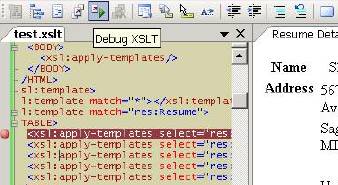
Open an XSLT file in the IDE and the XML menu and toolbar will both appear with “Debug XSLT” options. Selecting debug will prompt you for an XML file to transform. The output appears in real time.
What is amazing about the debugger is the number of classic debugger features that “just work”. You can set break points, step in, step over, and run to cursor. The locals and watch windows work, as does the call stack window (you can see which apply-templates brought you to the current location). Another goodie: the immediate window lets you type in XPATH expressions for evaluation in the current context.
Wait, there’s more!
2005 can also step into the Transform method of an XslCompiledTransform instance. Just enable debugging by passing a true as the first parameter for the XslCompiledTransform constructor. Be sure to read the remarks section of the documentation because some restrictions apply. In one scenario I can consistently crash the release candidate build of 2005.
When I did the Atlas hands on lab weeks ago, the following piece of code jumped out at me:
int index = Array.BinarySearch(
autoCompleteWordList,
prefixText,
new CaseInsensitiveComparer()
);
if (index < 0)
{
index = ~index;
}
Why is the code doing a bitwise complement (~) on the return value of BinarySearch?
My next stop was the documentation for the return value of Array.BinarySearch, which states:
The index of the specified value in the specified array, if value is found. If value is not found and value is less than one or more elements in array, a negative number which is the bitwise complement of the index of the first element that is larger than value
In other words, if you don’t find an exact match you can flip all the bits and have an index pointing to something close – a good trick to know when building an auto-complete control.
One of the advantages to ASP.NET server controls is the ability to package them into an assembly and reference them from other web applications. Server controls are relatively difficult to write but easy to reuse. User controls (ascx files), on the other hand, are relatively easy to develop, but don't like to swing with other projects. A common solution in 1.x involves setting up virtual directories. Yuck.
The ASP.NET 2.0 environment is different. We have MSBuild. We have an ASP.NET compiler. Perhaps you've also noticed we have a tool by the name of ILMerge.
Here is a proof of concept.
Step 1: I created a new solution in Visual Studio 2005 and added a plain class library project. I then added two user controls to the project, which Visual Studio doesn’t like initially, but it does all work, even the intellisense. The first user control is all inline code:
<%@ Control Language="C#" ClassName="SayHello" >

<script runat="server">
  <protected void Page_Load(object sender, EventArgs e)
  {
    label.Text = "Hello at " DateTime.Now.ToShortTimeString();
  }
</script>

<asp:Label runat="server" ID="label"/>
The second control, SayGoodbye.ascx, is the same, except it puts the Page_Load logic into a separate CodeFile by the name of SayGoodbye.cs.
Step 2: One of the cool features of Visual Studio 2005 is that the project files are MSBuild files. The default .csproj file for the class library I created does not know what to do with .ascx user control files, but I help it. I can right-click the project and select unload, then right-click the now disabled project and select Edit. Behold - the project is exposed naked before me. Pure angle-brackety goodness.
What I want to do at this point is modify the project to run the ASP.NET precompilation task – easy enough since there is an MSBuild task available by the name of AspNetCompiler. What is tricky is that AspNetCompiler will likely produce multiple assemblies. The compilation tool will batch compile by default, which means one assembly per directory of user control files. Of course we don’t want to keep all the ascx files in the root of the project, and we don't want to reference an entire directory of .dll files, so this is where ILMerge comes in.
ILMerge is a utility to merge multiple .NET assemblies into a single assembly. Combining AspNetCompiler and ILMerge together gives us something like the following:
<Project DefaultTargets="CompileUserControls"
         xmlns="http://schemas.microsoft.com/developer/msbuild/2003">
           ...
  <Target Name="CompileUserControls">
    <!-- TargetPath cannot be underneath PhysicalPath :( -->
    <AspNetCompiler
      Debug="false"
      PhysicalPath="$(MSBuildProjectDirectory)"
      TargetPath="$(TempDirectory)"
      Updateable="false"
      Force="true"
      VirtualPath="$(MSBuildProjectName)" />

    <CreateItem Include="$(TempDirectory)\bin\*.dll">
      <Output ItemName="PrecompiledAssemblies" TaskParameter="Include" />
    </CreateItem>

    <Exec Command="$(ILMergeEXE) /out:$(MSBuildProjectName).dll
                    /targetplatform:v2 @(PrecompiledAssemblies, ' ')" />
  </Target>
    ...
Inside the target I first run the AspNetCompiler and produce all the user control assemblies. Next, I need a list of all the assemblies the compiler just spit out. I do this with
Plop! Out comes ReusableControls.dll.
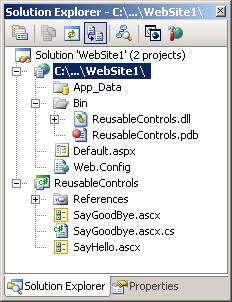
For the last step, I created a new web project and referenced ReusableControls.dll, then created a little test aspx web form.
<%@ Page Language="C#" %>
<%@ Register TagPrefix="rc" Namespace="ASP" Assembly="ReusableControls" %>
<html xmlns="http://www.w3.org/1999/xhtml">
<form id="form1" runat="server">
<rc:SayHello runat="server" ID="hello" />
<br />
   <rc:saygoodbye_ascx runat="server" ID="goodbye" />
  <br />
</form>
Notice in the @ Register directive we need to specify a namespace of ASP, as this is the default given by the AspNetCompiler. The compiler also munges the user control name when a CodeFile is used – we are using the class that was code-generated from the SayGoodbye.ascx file and inherits from the SayGoodbye class in the CodeFile. With inline code there is no adjustment.
It might be possible to also re-use master pages and webforms with a little bit of VirtualPathProvider trickery, but I’m not going there as yet. I want to see how this will shake out at RTM time when combined with the Build Project that should arrive, as announced by others.

 OdeToCode by K. Scott Allen
 Subscribe
 Twitter
 Search
 About
About
 Learn C#