
When ASP.NET 2.0 compiles a web site, it reads the site’s web.config to pick up a few settings that affect the generated code. For instance, ASP.NET reads the <profile> section to generate the code for a Profile class with strongly typed properties.
What may not be intuitive at first is what happens with these web.config settings when the ASP.NET precompilation tool creates a “non-updateable” web site (a full precompilation). For instance, we can set a default theme and master page for the a site in web.config:
When performing a full precompilation, the ASP.NET compiler bakes the theme and master page settings into the generated code. This means if you go back and change the web.config to use Theme2 and MasterPage2, the settings won’t make a difference in a non-updateable web site. The site happily goes along using the web.config settings in effect when precompilation took place (Theme1, MasterPage1).
On one hand, the behavior makes sense, because we did ask for a non-updateable web site, right? On the other hand, we can change other areas (like a connection string or an authorization entry), and the website behaves differently. It’s just a case of knowing which settings are used during the parsing / compilation, and which settings are used at runtime.
If we want to specify the default theme in web.config, and use precompilation, and want the ability to switch the default theme in production, then there are still options.
The first option is to precompile to an updateable web-site. For a precompiled, updateable web site, the .aspx source code remains in tact and deployed. The ASP.NET runtime will regenerate code for the .aspx when the web.config setting changes.
A second option is to hook the Pre_Init event. Even on a non-updateable web site, the PreInit event can set the Theme and MasterPageFile properties of a form to override the web.config settings. The configuration API makes it easy to read any updated web.config settings.
I had two grueling flights to get to Redmond today. I feel like I left home about 1 week ago, although the trip only took 9 hours.
Along the way, I plowed through:
The March issue of MSDN Magazine. Jeffrey Richter’s Optex article was a good read, and “Legal Doesn’t Think the Way You Do” was excellent. I think a regular column giving the perspectives of the non-developer roles we interact with would be enlightening.
One Night @ The Call Center. I don’t think this book is for sale in the U.S.A, and probably never will be. I got the book as a gift. The story centers on a group of friends who work at a technical call center in India. The Americans who call are all idiots and can’t operate basic kitchen appliances. The writing is funny and insightful, and I could connect with the characters. Worth a read, if you can find a copy.
The March issue of National Geographic. There was a fascinating story on using DNA to trace the journey of humanity of out Africa. Another story covered the environmental impacts of coal mining – which I’ve seen up close. It’s not pretty.
Eventually I do what I always do on an airplane. Close my eyes, listen to music, and pretend I’m not on an airplane. Never works.
I looked at the following code and thought it should replace a file’s existing extension with “.xml”.
It might be easy to spot in isolation, but when “foo.log” didn’t transform into “foo.xml” on disk, I went looking for the hard stuff first – swallowed exceptions, bad conditional logic, etc. I didn’t see the misplaced paren until later.
Another waste of time was a production app that looked like it was running under a user’s credentials instead of the NETWORK SERVICE account. A quick glance at the badly formatted web.config file seemed to indicate everything was setup properly. Impersonation should only be on for requests in the ManagementStuff directory.
This time I went off looking at IIS settings, machine.config settings, and even had FileMon and Process Explorer running. After some time I returned to the web.config and noticed someone closed the location element tag too early. ASP.NET was using impersonation for the entire application.
While on the topic of wasting time – when using Google to search for “Tablet PC”, the first ‘sponsored link’ to appear is www.Dell.com. It’s nice of the Dell sales and marketing department to sponsor this link, considering they don’t sell a Tablet PC. I wonder how long it takes the average web surfer to figure out there are no Tablet’s available, and how many of them feel deceived.
Occam’s razor can save us time with the debugger, but can’t save us from salespeople.
The following information applies to ASP.NET 2.0
The default value for AutoEventWireup is true for a C# web form, and false for a VB.NET web form. The IDE adds the default values to the @ Page directive for a new web form. The difference in defaults is partly because VB.NET has a mechanism for defining an event handler and subscribing to an event in one graceful motion (the Handles keyword).
An easy way to generate the above code is to use the drop down controls that sit just above the editor. Note: C# doesn’t make the dropdown list of events available when editing a code-beside file, but the dropdown is available when writing in-line code.
There is no equivalent to the Handles keyword in C# (anonymous event handlers are arguably close, but just not the same). When AutoEventWireup is true, all we need to do is follow the method naming convention of Page_EventToHandle. The ASP.NET runtime will automatically find and fire the method for the appropriate event.
If we switch to AutoEventWireup=”true” for a VB.NET web form, we can use the magic Page_EventName approach. The only change to the earlier VB.NET code would be to drop the Handles clause, and the events fire correctly.
If we switch to AutoEventWireup=”false” for a C# web form, there is a little extra work to do. Somewhere we need to explicitly wire up events. Here is one approach.
Here are the methods the runtime will look for when AutoEventWireup is true.
When AutoEventWireup is true, the runtime has to look for each of the page event handlers using code like the following.
Notice the member search is case-insensitive, which isn’t surprising since VB.NET is case-insensitive. What is surprising (to me) is that the following works, too.
If the runtime can’t make an EventHandler delegate, it will then try to make a delegate to a method with an empty parameter list. Yes, that's up to 28 calls to CreateDelegate per web form with AutoEventWireup="true".
The latest episode of dnrTV with Marc Miller and Karl Franklin is fascinating. Karl asked his blog readers to submit ideas for a tool that Marc would build using the DXCore framework. I suggested building a tool to rearrange the code inside a class based on accessibility modifiers and some other criteria, as I’ve often rearranged strange code by hand to fit a style I’m accustomed to. Marc finished the feature in less than an hour.
DXCore kidnaps the Visual Studio extensibility model and hides it in the trunk of a late model Buick. DXCore replaces the extensiblity API with a a richer object model for building plug-ins. DevExpress builds it’s own commercial refactoring plug-ins on top of DXCore. The API is well organized, but huge. Once you’ve learned your way around, however, you can bend the IDE to your will.
Marc and Karl also referred to me as Paul, but I don’t mind. I mix up names all the time.
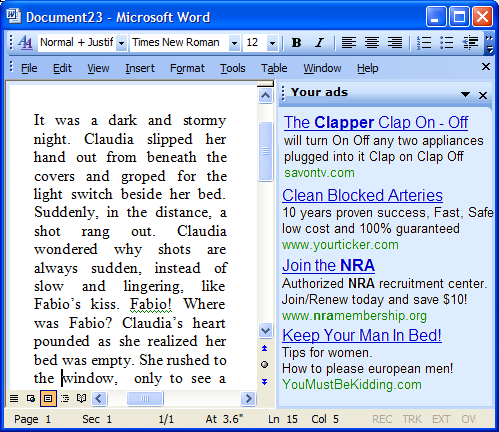
This might be old news to some, but reports say Microsoft is thinking of making a free, ad-supported version of Office.
I’d like to beta test the software to see what it can do. I’m wondering how smart the ads can be. There is smart, as in "keyword smart", and then there is really smart...
andyclap commented on my recent “Life With XAML” article:
“Did the brave OO language research guys give (the better part of) their lives in vain; their graves to be desecrated by the vile 1970s SGML nincompoops?
From this sample, the only function of XAML seems to be to put the foul-tasting XML syntactic sugar around a very ordinary presentation paradigm.”
Colorful language, andyclap, I enjoyed reading the entire comment. I wish my article had gotten across the point that object orientation isn’t dead with declarative markup. Many of the articles I’ve read about WPF (a.k.a. Avalon) overstress the loving embrace of angled brackets, and I tried to put in a slightly different spin. Non-trivial WPF applications still need both declarative XAML and imperative code.
In many scenarios it’s easier to describe what the goal is that you want to achieve, instead of descrtibing how to get to the goal.
I’ll turn again to an ASP.NET example. Here is some code imperatively building part of a webform.
We must specify the commands to reach the goal: we want the form to contain a Panel object, and the Panel object to contain a Label object. Unfortunately, all the commands obscure the goal, particularly as we add more controls and a deeper hierarchy. It’s not surprising that ASP.NET lets us use a declarative style, as HTML is a declarative language and the two need to intermingle. The declarative form would look like the following:
In the declarative form, the goal is easier to see, and consequently easier to understand, maintain, and modify. Declarative programming is also easier for tools to understand, which leads to more designers to visualize declarative programming compared to imperative programming.
Still, everything we do in software requires a tradeoff, and declarative programming isn’t well suited for every task. In my article I decided it was easier to use imperative code and a loop to define a grid instead of using XAML. On the other hand, workflows come to mind as a tasks that are easier to specify declaratively. Since the runtime and our hardware are all imperative, imperative programming will still be around for a long time.

 OdeToCode by K. Scott Allen
 Subscribe
 Twitter
 Search
 About
About
 Learn C#