
One of the benefits of moving to .NET 2.0 is having a clean build computer. A build computer is a machine where software can compile in an isolated environment, and away from the quirkiness of a machine in day-to-day use. The goal is to produce repeatable builds for test and production with no manual steps and a minimum amount of overhead. Since the .NET framework 2.0 installation includes MSBuild.exe (which can parse project and solution files, compile source code, and produce binaries), there is no need to install Visual Studio on a build machine.
Web Application Projects throw in a twist because they import a .targets file: Microsoft.WebApplication.targets. The Web Application Projects installation will copy this file to a machine, but I was hesitant to run the install on a build computer. The install assumes Visual Studio will be on the computer, because it asks to download a VS specific update.
The good news is that copying Microsoft.WebApplication.targets to the build computer works. The file lives in the Microsoft\v8.0\WebApplications sub directory of the MSBuild extensions path (typically “c:\Program Files\MSBuild”).
P.S. Yes, I know about Team Foundation Build, but the build scripts and framework I’ve been using for 5 years work so well, so I’m not compelled to switch.
Rob Howard wrote a piece for MSDN Magazine on “Keeping Secrets in ASP.NET 2.0”. The article is a good introduction on how to encrypt configuration data in web.config.
Something I’ve had to do which wasn’t immediately obvious to me was encrypt the identity section of web.config for a specific location. For example, let’s say I don’t want the username and password in the following web.config file to appear in plain text.
From the command line, a first crack at encryption might look like the following …
… except the above command only encrypts the first identity section, not the identity section inside of the <location> tag. The only way to reach the second identity section is to specify a location parameter, which is not available with the –pef switch, but is available with the –pe switch.
The difference between –pef and –pe is subtle. The –pef switch uses a physical directory path to find web.config, while –pe uses a virtual path.
Google Trends is in fashion these days. The tool will slice and dice relative search volumes by city and geographic region. I can’t see anyone mining useful data to make strategic business decisions based on relative volumes, but I do see an endless source of fodder for intellectual debates. These numbers are wide open for interpretation.
Here are my explanations:
People are most interested in you when you have something to give them.
Don’t eat turkey in Portland or Seattle.
The world is divided on the spelling of aluminum.
Finally, more people search for statistics than they do the truth.
Years ago, I wrote embedded firmware for 8-bit devices. One set of portable devices could calculate the octane rating of a gasoline sample by measuring the sample’s absorption of near-infrared light*, and are still in production today. Agencies could use the device to make sure gasoline stations were selling gas with the octane ratings they advertised. In the U.S., gas stations typically sell at least two grades of petrol: regular and supreme. Supreme commands a 10 to 15 percent price premium. Regular gas is around 87 PON**, and premium is about 91 PON.
During that time, I learned that buying gas with a higher octane rating than my car requires has absolutely no benefit. Higher-octane gas doesn’t improve gas mileage or horsepower. The octane rating measures a gasoline’s ability to resist premature detonation in the combustion chamber. Premature detonation leads to knocking and pinging sounds in the engine, and is bad because the resulting explosion hammers on the engine’s pistons and leads to damage***.
If my engine isn’t knocking, I stick with the cheaper gas and lower octane ratings (as long as I'm meeting manufacturer’s recommendations).
* Only special Cooperative Fuels Research (CFR) engines can produce an official octane reading.
** U.S. pumps display a Pump Octane Number (PON), which is the average of the gasoline’s Research Octane Number (RON) and Motor Octane Number (MON). PON = (RON + MON) / 2. RON measures the gasoline's anti-knock performance under mild operating conditions, while MON measures under harsher conditions (higher RPMs, for instance).
*** Car manufacturers in the early 1900s were trying to build higher compression engines with more power, but premature detonation was destroying the engines. They solved this problem in the 1920s by adding tetraethyl lead to gasoline. Lead is poisonous, of course, but it did boost octane ratings so we forged ahead. The U.S. banned lead additives in 1988. One of lead’s replacements, methyl tertiary butyl ether (MTBE), also boosts octane ratings and as a bonus, lowers emissions. Unfortunately, MTBE is carcinogenic and highly water-soluble. Many states have banned the use of MTBE.
There is an appealing simplicity to the following code.
The software’s goals are exposed. The essence remains free from the details of collecting data and rendering results. When a few bad customers raise food costs by ordering pizzas and then disappearing, even a pointy-haired boss can cut and paste the solution, which is to make customers pay before sending an order to the kitchen.
Unfortunately, only textual command line applications can come close to resembling this pseudo-code. We build graphical applications, and shred the logic across event handlers. We hide the essence of the software inside the details of button click events.
Events are wonderful for decoupling components, but they tend to increase the complexity of an application’s goal. Think of an online pizza store built using ASP.NET. The above code is broken out across multiple forms (or with AJAX, multiple event handlers in the same form). ASP.NET is fundamentally an event-driven framework, and we program in response to events. Using an MVC pattern can decouple the interface and the controlling logic, but is still reactive programming and re-portrays the same difficulties at a higher level of abstraction.
Web development is hard. What can we do?
One idea is to program the web with a continuation framework. One implementation of this idea is Seaside:
What if you could express a complex, multi-page workflow in a single method? Unlike servlet models which require a separate handler for each page or request, Seaside models an entire user session as a continuous piece of code, with natural, linear control flow. In Seaside, components can call and return to each other like subroutines; string a few of those calls together in a method, just as if you were using console I/O or opening modal dialog boxes, and you have a workflow. And yes, the back button will still work.
Ian Griffiths posts a stellar introduction to continuations for .NET developers in “Continuations for User Journeys in Web Applications Considered Harmful”. As the title suggests, Ian also lists reasons why continuations are a bad idea. Ian ends with the following:
“My final objection is a bit more abstract: I think it’s a mistake to choose an abstraction that badly misrepresents the underlying reality. We made this mistake with various distributed object model technologies last decade.”
I think Ian raises valid points. The syntax of a general-purpose programming language, however expressive it is, doesn’t seem like a big enough blanket to hide all the complexities in modern web applications. Before Ian’s post, Don Box pointed to Windows Workflow as a “continuation management runtime”, and this idea is exciting.
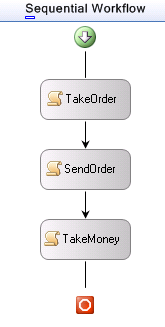
Windows Workflow is a multifaceted technology. You can look at WF as a tool to manage long-running and stateful workflows with pluggable support for persistence services, tracking services, and transactions. You can also look at WF as a visual tool for building solutions with a domain specific language. These two faces of WF are particularly appealing to anyone who wants to bring the essence of an application back to the surface where it belongs.
The one thorn here is our old nemesis: the web browser’s back button. In a perfect world, we could model workflows for the web using simple sequential workflows like the one shown in this post. Unfortunately, typical WF solutions will look for specific types of events at specific steps in the workflow process. The browser’s back button puts users on a previous step, but there is no way to reverse or jump to an arbitrary step in a sequential workflow. Sequential workflows march inevitably forward. Jon Flanders has an ASP.NET / WF page-flow sample that avoids this problem by using a state machine workflow and a “catch all” event that takes a discriminator parameter. This sounds like a Windows message loop, which isn’t great, but as Jon mentions the current level of integration is a bit ad hoc. (It would be interesting if WF provided the ability to fork or clone a workflow instance when it idles so that one could backtrack by moving to a previosuly cloned instance, similar to the way Seaside maintains previous execution contexts).
I hope the ASP.NET and Windows Workflow teams can work to make these two technologies fit together seamlessly and provide rich support from Visual Studio. It would be a joy to handle business processes with a domain specific language in a visual designer, and generate some skeletal web forms where we can finish off the sticky web details with C# and VB. This strikes me as a good balance.
Peter Bromberg posts some good rants on his unblog. His recent entry “Is Your Development Process Broken?” was timely.
Several months ago, a friend of a friend called me about a web app with a performance problem. I was going to turn the gig down because the app was written in C++ as an ISAPI extension. I haven’t touched either C++ or ISAPI for years and have no desire to relive those days*.
As it turns out, the performance problem was relatively easy to solve. SQL Profiler revealed a single page that could generate over 500,000 roundtrips to the database with a single button click. The code was issuing database commands inside of a nested loop.
It only took three months to get an update into production.
Three months?
Yeah. Three months.
The application was developed by an “IT Solutions Provider” with no source control. It was difficult to get the application to build. It was difficult to get a build into test that wasn’t broken. Nobody knew what they were testing, or what was changing. Total chaos. Just getting the process into shape was a major ordeal.
It is unthinkable that the company responsible for the mess markets the services of ‘experienced software professionals’. For professionals to bill a customer for this kind of service is nothing short of malpractice.
* It's worth noting that a search for “ISAPI” on Microsoft.com yields more security bulletins than articles on development. C++ is a double-edged knife with a pointy tip.
To prevent two pages from modifying in-process Session variables at the same time, the ASP.NET runtime uses a lock. When a request arrives for a page that reads and writes Session variables, the runtime acquires a writer lock. The writer lock will block other pages in the same Session who might write to the same session variables.
It’s easy to see the runtime implications of the lock when using two pages in a frameset. Here is a page that executes quickly:
Here is a page that executes slowly…
We can take these two pages and put them both inside of a frameset so they appear in the same window.
If we click the button on the slow page, then quickly click the button on the quick page, we’ll see the quick page doesn’t finish processing until the slow page ends. The slow page has to release a lock before the quick page can begin processing.
If this behavior causes a problem, one solution is to use the EnableSessionState attribute in the @ Page directive and tell the runtime how the page intends to use Session variables. If the Page doesn’t need Session state set EnableSessionState=”false” and avoid locking altogether. If the Page only reads Session variables use EnableSessionState=”ReadOnly” (although note that the runtime doesn’t throw an exception if the page actually does write to a Session variable – the write seems to happen just fine).

 OdeToCode by K. Scott Allen
 Subscribe
 Twitter
 Search
 About
About
 Learn C#