July 2006 - Posts

What's Wrong With This Code?

The developer who wrote the following code expects to see "Hello World!" printed twice. What will the developer see, and why? (Hint: "Hello, World!" will only appear once).

using System;

class Program
{
    
static void Main()
    {
        
Console.WriteLine(Child.Message);
        
new Child();
        
Console.WriteLine(Child.Message);
    }
}

class Parent
{
    
static Parent()
    {
        _message =
"Hello!";
    }

    
static public string Message
    {
        
get { return _message; }
    }

    
static protected string _message;
}

class Child : Parent
{
    
static Child()
    {
        _message =
"Hello, World!";
    }
}

posted by scott with 10 Comments

Package Pages, User Controls, and Master Pages for Reuse

Graham Dyson has an interesting project named WAPUL:

"WAPUL is a part of a project I've been developing for creating libraries of user controls, pages and master pages (although currently no support for a master page using another master page). Its aim is to avoid bodging or extra leg work when distributing (i.e. just one .dll file)."

Sharing controls and pages is a feature many people are looking for. Graham has a clever solution using code, a post-build step, and the aspnet_merge tool.

posted by scott with 0 Comments

Dependency Property Notes

I've run into dependency properties in both Windows Presentation Foundation and Windows Workflow Foundation. In trying to understand what they do, I ran across Drew Marsh's excellent introduction - "Avalon: Understanding DependencyObject and DependencyProperty". Drew's article has a WPF slant and I've mostly been seeing dependency properties from the workflow side.

In WF, dependency properties enable three features:

  • Attached properties
  • Activity binding
  • Meta properties

The attached property story in WF is similar to the attached property story in WPF - a parent object can add additional state to the children it manages. A WPF grid will attach Row and Column properties to its children. The dynamically attached properties allow the grid to store layout state in each child. In WF, the Conditioned Activity Group can attach a When property to each child. The When property holds a condition for the CAG to evaluate before running a child activity.

Activity binding gives a dependency property an ActivityBind object to evaluate when asked for its value. The ActivityBind can point to other fields, properties, or methods of activities inside a workflow. One activity could bind its input properties to a previous activity's outputs. Binding makes the data flow a part of the workflow model.

The behavior of meta properties caught me off guard. There are two types of dependency properties in WF activities: meta properties and instance properties. We set meta properties at design time and cannot change their value at runtime (they can't use binding, either). I think meta properties exist to guarantee the integrity of an activity. At runtime, I can't change the InterfaceType of a CallExternalMethod activity and screw up the rest of the parameter bindings because InterfaceType is a meta-property.  

Dependency properties are easier to understand once you see the use cases. You have to wonder if we'd be talking about dependency properties a all if the mainstream CLR languages were more dynamic.
posted by scott with 7 Comments

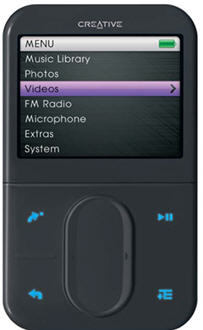
Review of the Creative Zen Vision:M

I'm the owner of a new 30GB Zen Vision:M. The Vision:M is a portable media center and plays both MP3s and videos. The unit currently retails between $269 and $299.

The 320x240 2.5'' LCD display looks remarkably good, even with the brightness setting at 50%. The Vision:M is a bit thicker and heavier compared to its iCompetitor, but has more color (262k versus 65k), and supports more file formats (DivX, XviD, MPEG 1/2/4, and WMV all play). I'll take function over form. The rechargeable Li-Ion battery lasted over 10 hours on a mix of video and audio (mostly audio).

I did not install the bundled software. Windows Media Player 10 recognized the device and synchronized content without any fuss. I've synched music, TV shows from a Media Center, and movies in WMV and DivX format. Of course, not everything you can record with Media Center will synch with an external device, thanks to the pinheads at the MPAA.

The only problem I've had is with an MSDN web cast. It seems there is an extra stream in the web casts and the stream confuses WMP. Fortunately, Marauderz M2PMCEncoderZX converts the MSDN file, and adds some additional options for anyone who is unhappy with the default conversion settings WMP uses for portable media centers.

The Vision:M synchronizes and charges through a USB connection, but requires a small dongle to adapt the USB connector to the unit itself. A full USB re-charging takes about 4 hours. The dongle includes connections for a charging with a DC adapter, and an A/V out. Creative made life more difficult (and more expensive) by not using a standard camcorder pinout for the 3.5mm AV jack. A little bit of splicing can work around this problem.

A touch pad on the front scrolls through menus. It can take some time to become accustomed to the touchpad, but the sensitivity is adjustable. The Vision:M also includes a microphone and FM stereo receiver (but no line input). A PIM is included that will sych with Outlook, although I haven't tried this feature (it requires an install of the bundled software, which I've have not tried).

Overall, thumbs up for the Creative Zen Vision:M.

posted by scott with 1 Comments

Narrative JavaScript

I stumbled across Narrative JavaScript this weekend.

NJS uses a compiler to generate asynchronous JavaScript from procedural JavaScript. You write simple code with local variables and blocking operations. NJS takes the simple code and spits out JavaScript with all the callbacks and asynchronous goo. It's like programming with continuations.

I wonder if Nikhil could add something like this to ScriptSharp.

posted by scott with 0 Comments

Pickup Lines In .NET

Imagine if everyone in the world knew .NET programming. The world might be a bit strange, but at least these pickup lines might work.

If I were a generic collection, I'd be strongly typed for you.

You must be the latest version, because I've been checking you out.

I have a small problem. I put an object in a Dictionary, but I lost the key! Can you come back to my place and help me look for it?

A TypeConverter just returned my heart, and it's ready to assign to you.

Let's turn off option strict and do some late night binding.

So, what's your hash code?

posted by scott with 15 Comments

It's Getting Crowded in the ThreadPool

It seems everybody loves the thread pool. The default scheduler in Windows Workflow uses the thread pool, as does ASP.NET and the BeginInvoke method of every delegate. There is only one pool per process, which seems a bit limiting with such a big party inside.

Joe Duffy says there is a lot of work going into improving the ThreadPool in future versions of the base class library, I wonder if future versions will allow for some partitioning of work. .

A couple people have asked me about custom thread pools. I do see the need in some scenarios, but writing a custom thread pool is hard. I generally point people to custom thread pools that smart people have already built:

Jon Skeet has a custom thread pool class on this page. The pool is configurable and allows you to separate your threads from the threads in the system pool.

Mike Woodring has a custom thread pool available on this page. The thread pool is configurable, instrumented, and has a great many features.

posted by scott with 4 Comments

On The Internet, Nobody Knows You’re Guilty

Information week has been covering the trial of a sysadmin accused of sabotaging 1,000 UBS Paine Webber servers. There is an abundance of circumstantial evidence in this case. Investigators found a printout of malicious code in the defendant’s bedroom, and the defendant bought an outstanding amount of stock puts that would benefit from a drop in UBS's price. Direct evidence, however, is from the ephemeral world of 1s and 0s: VPN logs, tape backups, and server audit trails. The defense called all these technologies into question.

Wolfe also used his closing arguments to attempt to rebut defense theories. Chris Adams, Duronio's attorney, has argued that hackers could have been responsible for the attack. He also argued that another systems administrator … did the attack, or that it was a penetration test gone awry by Cisco Systems. The attorney at different times went after the first forensics company to work on the case, @Stake Inc., saying that they couldn't be trusted because hackers worked for the company. Then he claimed the U.S. Secret Service, called in to investigate the case, did sloppy investigative work, as did the government's forensics expert. The defense's forensics expert … testified that he couldn't be sure that the logic bomb was responsible for the damage to the UBS system.

The defense went wild with conspiracy theories. When 40 people have the root password it’s easy to raise a shadow of a doubt. Even if the systems recorded biometric information, would you still trust an audit log? A rouge admin could alter any bit on a computer. The jury in this case found the defendant guily of securities and computer fraud on Wednesday. He'll face a maximum sentence of 6.5 to 8 years.

If you had to decide the fate of a person, what technologies would you trust as reliable sources of evidence?

posted by scott with 3 Comments

Dynamically Loading Controls in ASP.NET Is A Pain

Q: I'm using LoadControl to dynamically place objects into my web form. I've struggled with missing events and a host of other strange problems. I think Microsoft did a poor job designing this feature - it's a pain in my butt.

A: If you are just rotating advertisements on a page, using LoadControl is simple.

If you have a complex control with ViewState and events firing during postback, then LoadControl is difficult. It's not just LoadControl either - newing up a server side control and adding it to a Controls collection is also tricky.

ASP.NET provides a thick layer of abstraction for building web applications, but dynamically loading controls requires intimate knowledge of what is happening underneath the covers. You'll need to know the page lifecycle inside and out. You'll need to know how ViewState works, and how the runtime raises postback events. It takes some time, experience, trail, and error.

Here is a tip: keep it simple. I've seen developers overly complicate pages with dynamically loaded controls. In some scenarios, we can get the same behavior by adding the controls in markup and toggling the Visible property. The page is easier to test and modify, and generally will have fewer bugs.

Also, this "feature" doesn't have a bad design, really. You have to realize before going down this path that you'll be shouldering many responsibilities for your control that ASP.NET would otherwise take care of. It would be difficult for Microsoft to provide a general-purpose solution to dynamically loaded controls (but they might be able to cover 60% of the use cases).

If you still need dynamic controls, then read everything Scott Mitchell writes:

Dynamic Controls in ASP.NET
Working With Dynamically Created Controls
Dynamic Web Controls, Postbacks, and View State
Control building and ViewState Redux
Tip: When Adding Dynamic Controls, Specify an ID

posted by scott with 5 Comments

Dogfood

Q: Has Microsoft built and shipped any products with .NET?

A: A quick look around turns up the following frameworks, applications, and utilities with at least some managed code inside. I'm sure there are others I don't know about.

BizTalk ServerTeam Foundation Server, SQL Server Reporting Services, SQL Server Integration Services , Microsoft Small Business Accouting, SharePoint Services, Content Management Server, MSDN Online, Media Center, Visual Studio 2005

What else?

posted by scott with 5 Comments

PowerShell and AppPool Names

Yesterday we looked at stopping ASP.NET worker processes using PowerShell. However, I don't always want to stop the process by exe name or process ID, but by the name of the IIS application pool that the process is hosting. One way to do the job is with the iisapp.vbs script that ships with Windows Server.

PS>iisapp.vbs
W3WP.exe PID: 4420   AppPoolId: aspNet20
W3WP.exe PID: 2572   AppPoolId: DefaultAppPool

How does iisapp.vbs figure this out? The script uses WMI to look at the command line that started w3wp.exe. There is a parameter (-ap) that specifies the application pool by name.

I beat my head against the wall trying to figure out a nice way to do this in PowerShell. Finally, I came across a post by abhishek, who wrote some script to find the services living inside svchost.exe, and everything became clear.

function get-aspnetwp([string]$name="*")
{
   $list = get-process w3wp
   foreach($p in $list)
   {
      $filter = "Handle='" + $p.Id + "'"
      $wmip = get-WmiObject Win32_Process -filter $filter

      if($wmip.CommandLine -match "-ap `"(.+)`"")
      {
         $appName = $matches[1]
         $p | add-member NoteProperty AppPoolName $appName
      }
   }
   $list | where { $_.AppPoolName -like $name }
}

This is a function named get-aspnetwp. I can put this in my home configuration so it's always available. The function first gets a list of all processes named w3wp. The System.Diagnostics.Process objects in the list do not expose a property to inspect the command line, but we can use a WMI query to fetch the command line. A regular expression (-match) can parse out the application pool name (which always follows the -ap switch).

The function dynamically adds a property with the add-member cmdlet. The new property (AppPoolName) holds the application pool name. Ah, the power of a dynamic language! The last step in the function is to filter the list of objects against the incoming name parameter.

Now we can party...

PS> get-aspnetwp

Handles  NPM(K)    PM(K)      WS(K) VM(M)   CPU(s)     Id ProcessName
-------  ------    -----      ----- -----   ------     -- -----------
    419      30    31128       3924   144     2.09   2572 w3wp
    387      14    24580       7232   157     1.00   4420 w3wp

and …

PS> get-aspnetwp | select Id, AppPoolName, StartTime | format-list

Id          : 4420
AppPoolName : aspNet20
StartTime   : 7/10/2006 10:31:08 PM

Id          : 6064
AppPoolName : DefaultAppPool
StartTime   : 7/10/2006 11:56:57 PM

and …

PS> get-aspnetwp DefaultAppPool | kill

The little function gives us object we can pipe to other cmdlets, like measure-object, where-object, select-object, etc. Sweetness.

For more PowerShell goodness, check out the Powershell blog, the free IDE, and Scott Hanselman's podcast.

posted by scott with 2 Comments

50 Ways to Kill a Process

I've been learning PowerShell and alternating between frustration and fascination. PowerShell is potent but comes with a learning curve. ScottGu recently posted about using tasklist and taskkill to stop an ASP.NET worker process, and I thought it might be a good experience to give this a whirl at the PS prompt.

Cmdlets are the built-in commands of PowerShell. The get-process cmdlet is equivalent to tasklist, and can return all running processes:

PS> get-process | where { $_.Name -eq "w3wp" }

Handles  NPM(K)    PM(K)      WS(K) VM(M)   CPU(s)     Id ProcessName
-------  ------    -----      ----- -----   ------     -- -----------
    480      14    26288      11552   159     1.52   2580 w3wp
    351      21    12464      22360   111     0.45   4616 w3wp

Here we've filtered the process list by piping into the where-object cmdlet. The two worker processes pass the filter and appear in the output.

One of the significant concepts behind PS is that it doesn't pipe plain text - it passes objects in the pipeline. The get-process cmdlet returns a collection of System.Diagnostics.Process objects - the same Process class we know and love from the .NET base class library, and the same class that has a Kill method.

PS> get-process | where { $_.Name -eq "w3wp" } |
    foreach { $_.Kill() }

$_ represents the current pipeline object, so the above command will invoke the Kill method of each Process object that makes it's way through the filter. We can use some shortcuts for less typing.

PS> get-process w3wp | stop-process

This filters the process list using a parameter to get-process, and pipes the output into a stop-process cmdlet. If this still seems too wordy, we can take a couple more shortcuts and use the get-process alias of gps, and the stop-processes alias of kill:

PS> gps w3wp | kill

Tune in tomorrow when we find the application pool name and uptime of each worker process.

The problem is all inside your head
She said to me
The answer is easy if you
Take it logically
I’d like to help you in your struggle
To be free
There must be fifty ways
To kill a process

CHORUS:
You need a PowerShell hack, Jack
Do a task scan, Stan
You don’t need to destroy, Roy
Just get yourself free
Write in C++, Gus
You don’t need to discuss much
Just drop the PID, Lee
And get yourself free…

Apologies to Paul Simon.

posted by scott with 5 Comments

Community News

I'm excited to be part of By The Community, For The Community on the ASP.NET site. Go vote for the sample you'd like to see built, and an MVP will build it. If you have any suggestions for future samples, drop me a comment here.

Here is how some of my compadres are spending their time:

Sahil Malik set up shop on a new site: Winsmarts.Com. He's got his blog on and is going to run an ADO.NET boot camp this month.[1]

Bill Ryan has been writing a book for MS Learning and making covert trips to the mothership in Redmond. [2]

Wally McClure continues to smother the world with Wally. Wally in audio. Wally in print. [3]

Frans Bouma just shipped v2.0 of the O/R mapper and generator LLBLGen Pro.[4]

David Totzke is part of the team behind the launch of InfoQ.com - "Tracking change and innovation in the enterprise software development community". [5]

DonXML just shipped XPathMania. [6]

Sonu Kapoor continues to expand the ultra-aggregating DotNetSlackers.

Gavin Joyce launched DotNetKicks.

Great people, all of them.

[1] I've diagnosed Sahil with abdominochoreophobia - a fear of belly dancers.

[2] I'm not sure how many books Bill is currently coauthoring - I think it's around 50. Better him then me.

[3] Oh, and Wally made an Atlas video, too.

[4] I can't say anything about Frans; he'd argue with me and win.

[5] When I think of Dave, I think of Canada - home of the real Smarties (which don't seem to be available here in the U.S.). 

[6] Don has read more Heinlein than anyone I know, which makes him cool.  

posted by scott with 1 Comments

Impersonation and Application_Start in ASP.NET

Q: I want to query my database and cache some static data during the Application_Start event. SQL Server requires a trusted connection, and I'm using impersonation in web.config.

<identity impersonate="true" userName="jacque" password="crackme"/>

This works everywhere except Application_Start. The code in that method can't connect to the database. What's the dilly?

A: The short answer is that impersonation isn't "on" during Application_Start, so SQL Server is seeing the worker process identity (NETWORK SERVICE or ASPNET) instead of Jacque's identity.

Application_Start is an odd event. It's not really a request related event, but of course it won't fire until the first event arrives. The ASP.NET runtime doesn't start impersonation until it begins to process the request in earnest. This event fires just before impersonation begins, during a time when ASP.NET is laying out the cocktail napkins and setting up for the party.

There are at least a couple workarounds for the problem. You could use a Singleton* design pattern, and initialize the Singleton during a request when impersonation is active (perhaps during the BeginRequest event). You could also run the worker process under an identity with rights in SQL Server.

* Note: The article points to a "Double-Check Locking Is Broken" paper. DBCL is a problem in NET 1.x without special pre-cautions, but is not an issue in the stronger memory model of 2.0 (see rule #5 in section "Strong Model 2" of this Vance Morrison article).

posted by scott with 0 Comments

Lightning Visio: Step 3

Informative Diagrams for the Artistically Challenged

Step 1 gave us raw material to mold. Step 2 molded material into a readable diagram. The final step, step 3, is going to add some aesthetic touches. What? I thought this was a pragmatic process! Yes, that’s true. But we can always take 2 minutes to add finishing touches. We want to make the diagram easier to read, and we can use some additional formatting to draw attention to significant concepts in the drawing.

Here are three possible responses a developer might give when looking at our diagram:

A: Ahhhhh, I understand, now.
B: This is the most beautifully detailed diagram I’ve ever seen.
C: Who let their 3 year run amok with the plotter?

Our goal is to elicit response A.

The first thing I’ll do is generally add some thickness to the connector and shape lines. The spindly, thin lines that come by default are difficult to see and look weak. Choose varying line thickness to accent portions of the diagram. A line with a 9-point weight is a solid boundary - the kind of boundary you might want around a secure process. Right-click a shape and select Format –> Line to set the line properties. CTRL-click multiple shapes to set their properties all at once. This is also a good time to make the arrowheads on directional connectors stand out by adding thickness.

Finally, add a splash by filling your geometrical shapes with some color. Nothing too fancy, but white filled boxes on white paper don't stand out and can be hard to read. Right-click shapes, then select Format –> Fill. This is also a good time to add a title.

Voila! In less than 10 minutes we’ve created a diagram worth at least a few hundred words. We can hang it on walls, and include it in the architecture documentation. In this case, what we’ve built is actually more political commentary than software documentation, but the process worked just as well.

visio step 3

posted by scott with 0 Comments

Lightning Visio: Step 2

Fast Diagrams for the Artistically Challenged

Step 1 produced the raw materials we need. Step 2 is molding the raw materials into a comprehensible diagram. There is a fine line between making a diagram comprehensible and adding little touches for the sake of aesthetics. As time ticks on, remember the ultimate objective is to communicate ideas to a team of software developers, not sell the diagram at an art exhibition. We need something more permanent than a whiteboard sketch, but that only requires a minimum amount of time.

My first action is adjusting the font sizes in the diagram. The default size is too small to read easily, so I select all the objects in the diagram and crank up the font size (CTRL+A, right-click the diagram, Format -> Text).

Visio connector tool

Next, I’ll add connecting lines and arrows. I’m a fan of the “Dynamic Connector” for straight lines between shapes, and “Wavy Connector 1” for a less formal directional line. Connectors should always glue to a connection point because moving shapes around will be easier (the connectors will move with the shape). Many shapes already have connection points at logical locations (the small blue x symbol), but you can add or move connection points, too. Click the Connection Point Tool on the standard tool bar, select a shape, then hold down the CTRL key while clicking the location to add a connection point.

Finally, I’ll start moving shapes around to achieve alignment and symmetry. Nothing too fancy at this point, just make sure the spacing is consistent and that nothing is so unbalanced as to attract attention. Some tools that can help at this point include:

  • The Align Shapes dialog
  • The Snap and Glue toolbar
  • The keyboard arrow keys

The align shapes dialog (Shape –> Align Shapes) can quickly align shapes along their centers, tops, bottoms, left sides, or right sides. CTRL + click shapes to select multiple shapes for aligning.

snap toolbar

I use the Snap and Glue toolbar to toggle the snap feature (the first button in the toolbar). Snapping is a quick and easy way to get shapes spaced perfectly. I turn off the snap feature when I have some text I need to sit in the diagram at a precise location.

I find it easier to use the arrow keys instead of the mouse to move shapes. I get a precise amount of movement from a keystroke. Select a shape and use the arrow keys to make coarse movements. Hold down a Shift key when using the arrow keys for fine-grained movements.

Finally, too much white space can make a diagram hard to comprehend. Step 2 can be an iterative process of moving, shaping, aligning, and compacting. The diagram should become smaller and more symmetrical. Here is our diagram after step 2.

visio step 2

Tune in tomorrow evening as we apply the final changes in step 3.

posted by scott with 1 Comments

Lightning Visio: Step 1

Effective Diagrams for the Artistically Challenged

Over the years, I’ve had to whip up quite a few Visio diagrams. I used to spend a long time fiddling with different shapes and formatting, but not getting anything done. These days I have a three-step process that helps me crank out diagrams to communicate ideas. The diagrams won’t be the type you’ll include in product literature, nor will they win awards for innovation, but they are perfect to hang on the wall for a few weeks while a team is turning ideas into working software.

Step 1: A Shape for Every Entity

By the time I’ve reached Step 1, I have an idea of what I want to communicate in the drawing. For instance, I’ll know I want to show how account data comes into Service Foo (which is hosted in Process Bar) and runs through a series of pipes and filters.

I’ll create a blank drawing and open only the “Blocks” and “Connectors” shapes. In the File -> Shapes menu, these shapes are under “Block Diagrams” and “Visio Extras”. The other 3 bazillion shapes in Visio can be distracting, and keeping just boxes, circles, and arrows on hand helps me to focus.

The goal of Step 1 is to drag a shape into the drawing for each thing in the idea I need to communicate. I’ll add text to the shapes, but I don’t worry about connectors, arrows, colors, formatting, or precise positioning. That’s all fluff that comes later. By sticking to the basics, I’ll only spend 5 minutes dragging and dropping instead of 25 minutes debating the various aesthetics of the “Reference Callout 1” shape versus the “Reference Callout 2” shape.

This diagram I’m working on has four boxes and a dump truck. Yes, I broke my own rules by adding clip art. The art only took an extra 10 seconds thanks to the clip art “search for” feature, and I’ll justify it later. I now have a diagram with all the “things” I need to manipulate.

Visio Step 1

Tomorrow evening we will take the diagram through step 2.

posted by scott with 3 Comments

.NET Performance

Q: I need my application to perform better. Do you know any good resources on .NET performance?

A: I know one great resource. The resource is the "Improving .NET Application Performance and Scalability" book from Microsoft's Patterns and Practices group (or whatever their name is this quarter). You can read the book online, download the PDF, or buy the 1152 page paperback.

The book includes chapters dedicated to manage code performance, ASP.NET performance, and ADO.NET performance, among others. There guide also include How To articles and checklists you can use for reviews. It's an oldie but a goodie.

posted by scott with 1 Comments

Build Failed With No Errors

MSBuild does a good job of reporting build errors, but MSBuild can only report errors that the underlying Tasks report. Custom tasks add a lot of variation to quality of the error messages. Case in point is the following message, which popped up as a deadline loomed.

Build FAILED.
    0 Warning(s)
    0 Error(s)

Time Elapsed 00:00:05.85

The build failed, but there are no errors to report. Yup. It's strange messages like this that make me want to curse in German, but I don't know German, so I make the noises an angry Klingon might make after living in Berlin for 5 years.

I couldn't find any problems in the output until I set MSBuild for maximum verbosity (/verbosity:diagnostic, /v:diag for short), at which point I found this in the output:

	
Done building target "PrepareRdlFiles" in project "...".
Target "RunRdlCompiler" in file "...":
  Building target "RunRdlCompiler" completely.
  Output file "obj\Debug\RdlCompile.compiled" does not exist.
  Using "RdlCompile" task from assembly "Microsoft.ReportViewer.Common ...".
  Task "RdlCompile"
  Done executing task "RdlCompile" -- FAILED.
Done building target "RunRdlCompiler" in project "CareAlertsWeb.csproj" -- FAILED.

Someone had added .rdlc files to the project. These are "Client Report Definition" files - think of Reporting Services reports without a report server. Something was going wrong compiling the .rdlc files, but there still wasn't any information to determine what the problem was. Without knowing what else to do I started looking at the RdlCompile task with Reflector.

The RdlCompile task is interesting. The task doesn't compile files in the traditional sense (transform inputs into outputs). The task validates the report definition inside the .rdlc file. This step ensures we'll get compile time errors instead of runtime errors from the ReportViewer control if the report definition is invalid.

The assembly hosting RdlCompile referenced another assembly that was not on the build machine (Microsoft.ReportViewer.ProcessingObjectModel). Mysterious. Why this caused the task to fail without reporting a more specific error is also a mystery.

With all the assemblies were in place, the RdlCompile task finished with success. Running ReportViewer.exe installs all the required assemblies, you can find it in %Program Files%\Microsoft Visual Studio 8\SDK\v2.0\BootStrapper\Packages\ReportViewer.

posted by scott with 1 Comments

Getting Rid Of Inline Code in Global.asax (ASP.NET 2.0)

Q: I’m using the default web site project model in Visual Studio 2005. When I add a global.asax file to my web site, it wants me to use inline code. What do I do to get a code-behind file?

A: First, create a class that derives from HttpApplication. You'll want to override the Init event in this class. This class can live in a separate class library project, or in the App_Code directory. The class might look something like this:

using System;
using System.Web;

namespace OTC
{
    
public class Global : HttpApplication
    {
        
public override void Init()
        {
            BeginRequest +=
new EventHandler(Global_BeginRequest);
            
base.Init();
        }

        
void Global_BeginRequest(object sender, EventArgs e)
        {
            
throw new Exception("The method or operation is not implemented (yet).");
        }
    }
}

Next, add an Inherits attribute to global.asax, and point the attribute to the class we’ve just created.

<%@ Application Inherits="OTC.Global" Language="C#" %>

You now have code in a real code file. 

Before we close the post out, let me offer a word of advice:

Don’t let your HttpApplication derived class become cluttered up with a huge mess of unrelated code. Be a minimalist with global.asax code. Also, read Karl Seguin’s article “Global.asax? Use HttpModules Instead!”. HttpModules are reusable and configurable, and should be the preferred mechanism for processing most application events.

posted by scott with 3 Comments

Base Classes and Extending the @ Page Directive

Q: I'm having problems setting meta tags in my @ Page directive like in your article. My graphics designers don't understand code, but they can deal with page directives. It would be great to have this approach working. Do you have an example I can download?

A: Download the example web project.

The project contains four web forms, one class file, and one master page. The class file defines a base class for all web forms, and looks like the following.

using System;
using System.Web.UI;
using System.Web.UI.HtmlControls;

public class BasePage : Page
{
    
protected override void OnInit(EventArgs e)
    {        
        
base.OnInit(e);

        
if (!String.IsNullOrEmpty(MetaKeywords) && Header != null)
        {
            
HtmlMeta metaTag = new HtmlMeta();
            metaTag.Name =
"Content";
            metaTag.Content = MetaKeywords;
            Header.Controls.Add(metaTag);
        }
    }

    
private string _metaKeywords;
    
public string MetaKeywords
    {
        
get { return _metaKeywords; }
        
set { _metaKeywords = value; }
    }   
}

The article was demonstrating how to use a base class from a web form with inline code. We need a slightly different approach for web forms using code-beside.

This project has four combinations: 

  • web form with inline code and no master page
  • web form with inline code and a master page
  • web form with code-beside and no master page
  • web form with code-beside and a master page.

To set the MetaKeywords property from the @ Page directive with code-beside, you'll need the following:

<%@ Page Language="C#" CodeFile="CodeBeside.aspx.cs"
         CodeFileBaseClass="BasePage" Inherits="CodeBeside"
         MetaKeywords="fluffy wuffy duffy muffy" %>

Notice the use of the CodeFileBaseClass attribute, which is needed for ASP.NET to pick up the Metakeywords property at the time it generates code. The other required step is to make sure the class in the code-beside file derives from the base class we defined.

using System;

public partial class CodeBeside : BasePage
{
}

You'll still have red squiggly lines in the @ Page directive. Visual Studio is overly zealous about validating the @ Page directive, and won't like the Metakeywords attribute. This is just a validation error and doesn't prevent the web form from compiling and executing. ASP.NET will generate the right code the words inside the MetaKeywords attribute will render into the HTML output.

This approach isn't limited to just meta tags, we could give the base class other public properties that we can set in the @ Page directive and use at runtime.

Hope that helps...

posted by scott with 7 Comments

Life Of A Static

Q: In my application, I am using some static fields to hold information. How do I make sure the garbage collector doesn't collect the objects referenced by the static fields? How long will the objects stay in memory?

A: A static (C#) or shared (VB) field establishes a root reference. The garbage collector will only collect objects that can't be reached directly or indirectly from a root reference. The objects you reference from static fields are safe from garbage collection.

Assuming a static field always references the same object, the object will be around for the duration of the application (for the duration of the application domain, to be precise). You'll want to be careful referencing extremely large objects with static fields, because they'll be around for a long, long time. In a web app you might consider using the ASP.NET cache instead.

The biggest concern to have with static and shared fields is thread safety. If you have multiple threads running and are modifying the objects, you'll have to make sure to do so in a thread safe way. See Statics and Thread Safety Part One and Two.

posted by scott with 3 Comments