January 2007 - Posts

500

I've averaged 13.5 posts per month over the last 37 months to arrive at today's post #500.I'm not sure if I'll make another 500 posts, but I have pages of notes for posts covering ASP.NET, AJAX, Windows Workflow, WCSF, and more. I also have enough material for at least 15 more "What's Wrong with This Code" posts, which several people have told me are fun and educational. One day, I might even finish my "Design Patterns - A Love Story" post. Then again, maybe that story should be purged from the Internet forever. 

Thanks for reading!

posted by scott with 10 Comments

More on Managing Windows Workflow Events in ASP.NET

In the last post I pointed out problems you can experience trying to handle workflow events in an ASP.NET page. Before we get to a working solution, let's take a look at another pitfall.

We know the default WF scheduling service will select a thread from the CLR thread pool to execute workflows asynchronously. Generally speaking, this isn't a good approach for server side applications because we can tie up too many threads. Instead, we use the ManualWorkflowSchedulerService. The manual scheduler lets us run workflows on the same thread that is processing the HTTP request. We just need to call RunWorkflow on the service whenever we need a workflow to execute.

It's tempting to think the manual scheduler can make life easier since we don't have to worry about threads. For instance, let's suppose we want any unhandled faults originating from inside a workflow to bring the current request to a screeching halt. We want unhandled exceptions! When a workflow faults and throws an exception, WF will catch the exception and raise a WorkflowTerminated event. This event will fire on the same thread as the request that ran the faulty workflow.

Knowing that we want to end requests with an error, we could try to use global.asax like the following. After all, if we throw an exception on the current request thread, we should create the yellow screen of death (assuming the Page doesn't have an exception handler). Note: I'm using global.asax just to make this simple.

void Application_Start(object sender, EventArgs e)
{
    _workflowRuntime =
new WorkflowRuntime("wfConfiguration");

    _workflowRuntime.WorkflowTerminated +=
        
new EventHandler<WorkflowTerminatedEventArgs>
            (_workflowRuntime_WorkflowTerminated);

    _workflowRuntime.StartRuntime();

}
  
void _workflowRuntime_WorkflowTerminated
        (
object sender, WorkflowTerminatedEventArgs e)
{
    
throw e.Exception;        
}
        
private static WorkflowRuntime _workflowRuntime;

The problem is that the WorkflowRuntime is dedicated to its job. The runtime is tasked with telling all the event subscribers that a workflow terminated, and it is not going to let some unhandled exception prevent the rest of the subscribers from missing events. The WF runtime swallows our exception. See Ken Getz's article for how to use GetInvocationList to achieve this behavior.

How can we communicate the exception back to the Page? Consider the following code.

void _workflowRuntime_WorkflowTerminated
        (
object sender, WorkflowTerminatedEventArgs e)
{
    
HttpContext.Current.Items["WorkflowResult"] = e.Exception;
}

Now the web form can pull the exception out of the HTTP request context. Problem solved!

Oh, but wait - we are spiraling out of control. Now the ASP.NET developer has to remember to start workflows with the manual scheduler, and check the request context for exceptions, and use such and such a communication service to raise events to the workflow.

If you are going to the trouble to use Windows Workflow in an ASP.NET application, then you have an architectural responsibility to abstract away these problematic and sometimes dangerous scenarios to the point that the ASP.NET developer doesn't even know there is a workflow driving the process. Bring a mediator to the party.

posted by scott with 7 Comments

Managing Windows Workflow Events on a Web Server

Once you have the WorkflowRuntime up and running in an ASP.NET application or web service, you'll want handle key life cycle events like WorkflowTerminated and WorkflowCompleted. I want to warn you about some common pitfalls I've seen.

There are two subtle but extremely dangerous problems in the following code.

protected void Page_Load(object sender, EventArgs e)
{
    
// get a reference to our WorkflowRuntime singleton
    WorkflowRuntime runtime = ApplicationInstance.WorkflowRuntime;
    
    
// wire up an event handler
    runtime.WorkflowCompleted +=
        
new EventHandler<WorkflowCompletedEventArgs>
              (runtime_WorkflowCompleted);

    
// create and start a new workflow
    WorkflowInstance workflow;
    workflow = runtime.CreateWorkflow(
typeof(SomeWorkflow));
    workflow.Start();

    
// ask the manual scheduling service to execute the
    // workflow on this very thread
    ManualWorkflowSchedulerService scheduler;
    scheduler = runtime.GetService<
ManualWorkflowSchedulerService>();
    scheduler.RunWorkflow(workflow.InstanceId);
}

void runtime_WorkflowCompleted(object sender, WorkflowCompletedEventArgs e)
{
    
// depending on what the workflow did for us, this is where we would
    // tell the user the final price, or approve their document, or whatever
    // workflowy thing that might have happened
}

Think: Singletons and event handling. The WorkflowRuntime will typically be a singleton in an ASP.NET app. In the WF RTM version, you can have multiple WF runtimes executing inside the same AppDomain (this wasn’t true in the betas), but chances are you don't want to pay the performance overhead of spinning up a new WF runtime for each request. Thus, we have a single and globally accessible WF runtime. For questions about the ManualWorkflowSchedulerService, see my article on hosting Windows Workflow. This scheduler allows us to run the workflow instance synchronously - on the same thread as the request.

Problem #1: Someone Just Expensed a Ferrari

The WorkflowCompleted event will fire for any workflow that completes, not just the workflow we are executing inside this page (or web request).

Let's say the workflow is running some business rules to automatically approve or reject expense reports. This usually requires a human bean counter to get involved, but stick with me for a second and pretend it's all done in silicon. Let's say the workflow indicates approval or rejection with the OutputParameters property of the WorkflowCompletedEventArgs.

User Joe submits an expense report for his new red stapler. At the same time, I submit an expense report for a red Ferrari Enzo. There are two pages executing on the server, and both subscribed to the WorkflowCompleted event. If things work out just right, Joe's workflow will complete first and approve his expense report. The runtime will raise the completed event, which both pages handle. Since Joe's workflow indicated approval, Joe will soon be stapling papers while I get to go 0-60 in less than 3.5 seconds.

Problem #2: We Need More Power, Scotty!

To fire the completed event, the WorkflowRuntime maintains a reference to the Page object. We should assume the WorkflowRuntime, as a singleton, will live for the duration of the AppDomain. Assuming the Page object never un-subscribes from the completed event, it will be in memory for the duration of the AppDomain, too. The garbage collector can't take the Page out of memory while it's being referenced by the WF runtime. RAM will start to disappear over time.

Even worse, with each request another instance of this Page class will wire itself to the WorkflowRuntime, and each time a workflow completes the WF runtime will need to raise the event to all these zombie page objects. This will keep the CPU busy, too.

It won't be long before the server is sucking mud, and the company is out of money.
posted by scott with 8 Comments

TreeViews and Usability

treeview

One of the commercial applications I've worked on over the last few years has received consistent feedback from uses who dislike tree view controls. Many of these users are working with terminal emulators on a daily basis, so I first suspected that switching to a GUI came as a shock.

I did some research on tree controls and usability, but didn't uncover much information. Actually, many articles I found herald the tree view as the ideal solution for categorizing and drilling into large amounts of hierarchical information. Only Alan Cooper's book "About Face" turned up a caveat:

"Programmers tend to like this presentation [speaking of Tree controls]. It is often used as a file system navigator, and some find the format of the display to be effective – certainly more effective than scattering icons around in multiple windows on the desktop. Unfortunately, it is problematic for users because of the difficulty many nonprogrammer users with understanding hierarchical data structures. In general, it makes sense to use a treeview, no matter how tempting it may be, only in the case where what is being represented is "naturally" thought of as a hierarchy (such as a family tree). Using a treeview to represent arbitrary objects organized in an arbitrary fashion at the whim of a programmer is asking for big trouble when it comes to usability."

I've changed my initial suspicion. Now I suspect users don't have a problem with the mechanics of the tree view, but rather with the content of the tree view. It's not a case of how to work with the control, but where to start to get to the right node in the tree.

The more I think about the problem, the more I realize I face the same difficulty on an almost daily basis. When I call my cell phone company, I have to fit my specific problem into one of the three broad categories provided by the soothing sounds of an automated voice response system. If I initially choose the wrong category, I'm pretty well screwed and need to start over. This is frustrating.

A software alternative to the tree view is a search feature. Allow the user to get to the lowest level of detail without navigating a hierarchy of unfamiliar categories. This often works in the real world, too. If I can't find something in the categorized aisles of a hardware store, I ask someone who works there.

Interesting and somewhat related post: Luke Wroblewski has a look at the history of Amazon's Tab Navigation. I don't remember the last time I went to Amazon to browse categories, I always search for a specific item. It's well that they do away with tabs. 

Searching capability is vital these days. I wonder, will System.SearchEngine will ever appear as a namespace in the .NET library?

posted by scott with 8 Comments

Some JavaScript Links To Chew On

I've flagged a few links to noteworthy JavaScript posts over the last month.

Yahoo! Video: Advanced JavaScript Part I, Part II, Part III. A lecture by Douglas Crockford.

IEBlog: Jscript Inefficiencies Part I, Part II, Part III.

Rick Strahl: "FireBug 1.0 Beta Rocks". FireBug is a JavaScript debugger with some remarkable features.

Rick again: "HREF links and javascript : Navigation".

Jason Diamond: "Not Delegates".

Jim Ley: "JavaScript Closures".

Sergio Pereira: Quick Guide To Somewhat Advanced JavaScript.

Pathfinder: JsUnit – Agile AJAX Development

Mike West: Scope In JavaScript

posted by scott with 5 Comments

You Can't Touch My Windows Experience Index

Leave it to Microsoft to quantify everything.

The experience used to be emotional. There was the gentle purr of a power supply fan with the scent of plastics in the air. The caress of a firm, rubberized nipple would make pixels dance in front of my eyes. Those days are over.

My Windows Experience is now a cold, calculated number.
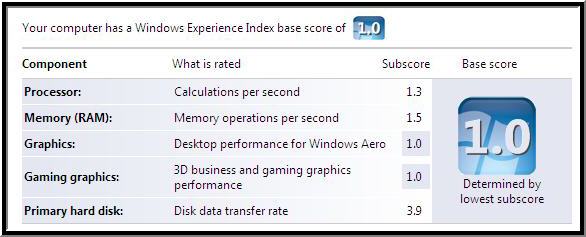
Windows Experience Index

Top that!

What's that you say? A low score is bad? Oh.

Well, this desktop was a top of the line computer…

… back in the year 2000.

posted by scott with 4 Comments

Managing the WorkflowRuntime In ASP.NET

If you want to use Windows Workflow in ASP.NET, you'll need create and maintain a WorkflowRuntime instance. What's the easiest approach to use?

The easiest approach (not necessarily the best), is to use global.asax.

<%@ Application Language="C#" %>
<%
@ Import Namespace="System.Workflow.Runtime" %>

<script runat="server">    
    
    
void Application_Start(object sender, EventArgs e)
    {
        InitializeWorkflowRuntime();

    }
    
    
void Application_End(object sender, EventArgs e)
    {
        
if (_workflowRuntime != null)
        {
            _workflowRuntime.Dispose();
        }

    }      

    
void InitializeWorkflowRuntime()
    {
        _workflowRuntime =
new WorkflowRuntime();
        
        
// ... additional configuration ...
        
    }
    
    
public WorkflowRuntime WorkflowRuntime
    {
        
get { return _workflowRuntime; }
    }
        
    
private WorkflowRuntime _workflowRuntime;
      
</script>

This approach gives us a WorkflowRuntime we can reach from any page. Remember, in an ASP.NET Web Site project, the runtime code-generates a strongly-typed ApplicationInstance property from global.asax for each web form. We can access the WorkflowRuntime property defined in global.asax with ease:

protected void Page_Load(object sender, EventArgs e)
{
    
// ...

    ApplicationInstance.WorkflowRuntime.CreateWorkflow( /* ... */ );

    
// ...
}

This approach is simple, straightforward, and easy, but let's think about the disadvantages.

First, global.asax makes the WF runtime readily available to the web application, but it's not so easy to obtain this reference from a data, business, or service layer. It's possible - but not pretty.

Secondly, global.asax can cause headaches. I tend to avoid adding global.asax to a project, as once the file comes into play it tends to become a dumping ground for global "stuff" that an application needs.

Generally speaking, a better approach is to manage the WF runtime from a lower layer in the application architecture. Using a Registry or Service Locator type pattern makes the runtime available through all layers of the application. Error reporting, logging, and tracking of workflows and their runtime can live inside one or more dedicated components. This approach requires a little more work, but provides the flexibility required for larger applications. More details to come.

posted by scott with 4 Comments

What's Wrong With This Code (#10)

This time, Joe Developer thinks he found a bug in the .NET framework. Joe read that the volatile modifier is "usually used for a field that is accessed by multiple threads without using the lock Statement". Joe wants to try this out, and writes the following class.

class Worker
{
    
public void Start()
    {
        queue =
new Queue<string>();

        
Thread[] threads = new Thread[maxThreads];
        
for (int i = 0; i < threads.Length; i++)
            threads[i] =
new Thread(PopulateQueue);

        
Array.ForEach(threads, delegate(Thread t) { t.Start(); });
        
Array.ForEach(threads, delegate(Thread t) { t.Join(); });
        
        
Debug.Assert(queue.Count == maxThreads * maxIterations);
    }

    
void PopulateQueue()
    {
        
for (int i = 0; i < maxIterations; i++)
        {
            queue.Enqueue(
"foo");
        }
    }

    
volatile Queue<string> queue;

    
const int maxThreads = 5;
    
const int maxIterations = 1000000;
}

This code ran successfully at least a dozen times, then suddenly blew up with the following exception:

System.ArgumentException was unhandled
Message="Destination array was not long enough.
Check destIndex and length, and the array's lower bounds."
Source="mscorlib"
ParamName=""
StackTrace:
at System.Array.Copy ...
at System.Collections.Generic.Queue`1.SetCapacity ...
at System.Collections.Generic.Queue`1.Enqueue ...
at Worker.PopulateQueue ...
...

Joe thinks something has gone terribly wrong in the CLR, and for once, Joe would like to show his boss a problem in someone else's software. What should his boss think?

posted by scott with 11 Comments

JavaScript and Threading

Someone asked me if the "asynchronous" in AJAX means we should be worried about thread safety and global variables in client-side script. This is an interesting question to ponder.

A search of the ECMAScript language specification returns zero hits for the word "thread". JavaScript, like C++, appears to leave threads as an implementation detail. There are no keywords or intrinsic ECMAScript objects available to manage threads, or to provide for thread synchronization.

I find it strange that there are articles like "Implementing Mutual Exclusion For AJAX" claiming to control threads. Some of these articles assert that integer assignment in JavaScript is an atomic operation. I've yet to see documentation that proves this assertion and I'm wary of this claim given the number of software layers between the scripting runtime and the hardware.

I don't think we are in a position to even worry about concurrent threads in script. With no mechanism to control threads, we have to trust our browsers to "do the right thing". IE7 appears to use a single thread for executing script code in a page. Based on experiments with the native debugger and Winspector, the thread appears to be a message-pumping UI thread. I'd have to assume that other browsers (at least on Windows) also follow a single threaded model for simplicity. I have no proof, so any insight readers can provide would be appreciated.

In trying to confirm this behavior, I came across a 2003 post by Eric Lippert: "What are "threading models", and what threading model do the script engines use?". Here is a juicy excerpt:

* When the script engine is in a state where it cannot possibly call an ActiveX object -- for instance, if it has just been created and has not started running code, or if it is just about to be shut down -- then the script engine really is free threaded, but who cares? It can't do much in this state.
* When the script engine is initialized -- when the script engine host has started the process of passing code and object model state to the engine -- the script engine morphs into an apartment threaded object. All calls to the script engine must be on the initializing thread until the script engine is shut down again.

Eric then muddies the water in a later comment:

It's very difficult to do true multi-threading inside IE. However, there are clever things you can do with the setTimeout method. I've also been thinking that it might be interesting to describe setTimeout from a continuation-passing-style perspective.

It doesn't appear that Eric ever followed up on this comment, unfortunately.

But what about the A in AJAX? Assuming xmlHttp is a native object it is free to use any number of background threads to free up the browser's UI. When xmlHttp raises an event, however, that call must marshal to the thread responsible for executing script.

I do wonder what this single threaded model means for the future. As the amount of script code for AJAX and WPF/E grows, this model has the potential of being a bottleneck.

posted by scott with 5 Comments

A WPF Wonderland

A couple months ago, I shared a ride to the Dallas airport with my friend Walt Ritscher. I remember Walt was excited about WPF and WPF/E - so excited it seems he now has a blog dedicated to the topic: WPF Wonderland.

Walt added some west coast flair to my WPF/E Game Of Life code and hosted the sample. You can give it a whirl if you have the December 2006 WPF/E CTP installed.

posted by scott with 0 Comments

AJAX UpdatePanels and ContentPlaceHolders

I've seen the following model popup frequently:

<asp:ScriptManager ID="ScriptManager1" runat="server" />

<
asp:Menu ID="Menu1" runat="server" Orientation="Horizontal">
    <Items>
        <asp:MenuItem
            
NavigateUrl="~/Default.aspx" Text="Default.aspx" />
        <asp:MenuItem
            
NavigateUrl="~/Default2.aspx" Text="Default2.aspx"  />
    </Items>
</
asp:Menu>

<
asp:UpdatePanel ID="UpdatePanel1" runat="server">
    <ContentTemplate>
        <asp:ContentPlaceHolder ID="ContentPlaceHolder1" runat="server"/>
    </ContentTemplate>
</
asp:UpdatePanel>

This is an ASP.NET MasterPage with a content placeholder wrapped inside an UpdatePanel. A menu control provides links to default.aspx and default2.aspx - both content pages that use this master page.

The misconception is that the update panel will magically reload only the area inside the ContentPlaceHolder control when the user clicks on a navigation link in the menu. This example uses a menu, but we could substitute any type of control that generates hyperlinks to a new page. Since both pages use the same master page, this behavior seems plausible.

The behavior described above isn't how AJAX and MasterPages work, however.

First, the hyperlink forces the browser to navigate to an entirely new page. There is no opportunity for the partial page rendering magic of AJAX to work. When the user clicks a navigational link, the browser will load 100% of the new page. If you want to update just the content area then you need the browser to stay on the same content page.

Secondly, ASP.NET always mashes the MasterPage and ContentPage into a single piece of output. From the client browser's perspective, it's all coming from the same resource. Each new page request will require ASP.NET to recreate both the master page and content page (assuming there is no caching). If you want to embed the contents of a new page into an existing page, then HTML IFRAME element still wants to be your friend.

posted by scott with 1 Comments

A Message For You

Some might say it's a day late, but nevertheless, it is a message. And it's for you.

Of course, you'll have to figure out what the message is by reading the source code. This year's code isn't quite as ugly as last year's code, but if you can figure this one out without a compiler - three cheers! If you do figure it out, you might still want to run the code as a console application to see the full effect...

using System;
using System.Collections;

class _2007_
{
    
static void Main()
    {
        
int x, y; x = y = 0;
        
Console.SetWindowSize(84, 7);
        
do
        {
            
foreach (string i in Order)
            {
                
foreach (int n in numbers[Int32.Parse(i)])
                {
                    
Console.SetCursorPosition(x + n % 5,
                                              y + n / 5);
                    
Console.ForegroundColor = SomeColor;
                    
Console.Write("@");
                }
                x += 6;
            }
        }
while (!Console.KeyAvailable && (x = y = 0) < 1);
    }

    
static IEnumerable Order
    {
        
get
        {
            
yield return 4.ToString(); yield return 6.ToString();
            
yield return 2.ToString(); yield return 2.ToString();
            
yield return 1.ToString(); yield return 0.ToString();
            
yield return 3.ToString(); yield return 8.ToString();
            
yield return 5.ToString(); yield return 0.ToString();
            
yield return 1.ToString(); yield return 8.ToString();
            
yield return 6.ToString(); yield return 7.ToString();
        }
    }

    
static int[][] numbers =
    {            
        
new int[] { },
        
new int[] {0,4,5,9,11,12,13,17,22},
        
new int[] {0,1,2,3,5,9,10,11,12,13,15,20},
        
new int[] {0,4,5,6,9,10,12,14,15,18,19,20,24},
        
new int[] {0,4,5,9,10,11,12,13,14,15,19,20,24},
        
new int[] {0,4,5,9,10,14,15,17,19,20,21,23,24},
        
new int[] {1,2,3,5,9,10,11,12,13,14,15,19,20,24},
        
new int[] {0,1,2,3,4,5,9,10,11,12,13,15,18,20,24},
        
new int[] {0,1,2,3,4,5,10,11,12,13,14,15,20,21,22,23,24}
    };

    
static ConsoleColor SomeColor
    {
        
get
        {
            
return (ConsoleColor)colors.GetValue(
                    rand.Next(colors.Length)
                );
        }
    }

    
static Array colors = Enum.GetValues(typeof(ConsoleColor));
    
static Random rand = new Random();
}


posted by scott with 7 Comments

Sidebar Gadget Article

A new year deserves a new OdeToCode article: "Developing Gadgets for the Windows Vista Sidebar".

Feedback is always appreciated.
posted by scott with 3 Comments