May 2007 - Posts

How To Stop a Team Foundation Server Build with Samurai Style

This afternoon I kicked off a Team Build and waited...

.. and waited ...

... and waited...

... and then realized something was terribly wrong with the TFS server. A general sense of panic swept into the office when we couldn't bring up the login dialog box on the server's console. A recent rash of hardware failures made us jumpy and we feared the worst. Just a couple months ago, 2 out of 3 drives in a RAID 5 array died in a single afternoon. What are the odds?

The server came back to life after a hard reboot, but the last build was "stuck". There wasn't any activity on the build server, yet TFS thought the build was still in progress. I couldn't find a way to stop the build in Visual Studio, so I turned to the Internet. My first search brought up KillBill.exe – a utility in the TFS PowerPack that "Stops a Team Build currently running on a build server". Perfect!
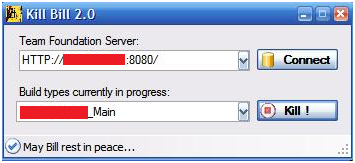
Afterwards, I found out you can also stop a build from the command line, but that's not nearly as entertaining as an application that evokes thoughts of a hyper-violent kung-fu cinematic mashup.

The other utility in the TFS PowerPack is the "Work Item Terminator". There is a theme at work in this project, and I like it. I hope future versions include the "Clockwork Orange Build Timer" and the "Check-in policy Robocop".

posted by scott with 1 Comments

Swinging In Silverlight

Note: this sample is now updated to work with Silverlight 1.0

I decided to catch up with the latest Silverlight release. With the WPF/E release last year I dabbled with Conway's Game Of Life, but instead of porting old code I decided to try something new. During my short stint in the video game industry I found Gamasutra to be a great source of technical articles, and the article "Advanced Character Physics" by Thomas Jakobsen gave me an idea. The article describes the verlet integration algorithm used in molecular dynamics models. The subject matter sounds intimidating, but the algorithm turns out to be relatively simple.

Verlet integration (pronounced vehr-LEY (think French)) doesn't track the velocities of each particle in a system. Instead, Verlet calculates a particle's next position using its current and previous positions. The nice feature of Verlet is that enforcing a constraint (like not allowing a particle to move outside of a wall, or not allowing a particle to move too far away from another, attached particle) is almost as easy as repositioning the particle – at least there is no need to calculate a new velocity.

I built a simple, swinging "rope" in Silverlight. The "rope" is composed of 12 Pluralsight logos. Gravity pulls the rope downward, while a left-to-right breeze can blow the rope across the screen. Credit Ian Griffiths for building the Pluralsight eye in XAML . A static screen shot doesn't show the realistic motion ...

... so if you have the Silverlight 1.0 beta install, try the sample here.

You can download the source code here.

Note to Karl Seguin: don't download the code. This was a late night hack on a holiday weekend. If you break into tears then it's not my fault! :)

posted by scott with 9 Comments

That's RAD

Back in February, JetBlue flight operations were shut down by a winter ice storm and a series of bad decisions. Some passengers stewed inside airplanes for 11 hours as the planes were stuck on the airport tarmac. Baseline tells the story of the JetBlue meltdown through the eyes of CIO Charles Mess.

There are more than a few interesting software stories inside the article. For instance, the checked baggage of enraged passengers was piled to the ceiling inside the JFK airport. JetBlue had no software in place to match passengers to their luggage. Time to call in the .NET developers:

A technology team … was dispatched to the airport to help out with the effort.

Over three days, programmers cobbled together an application using a Microsoft SQL database and handheld devices from Symbol Technologies that could scan a bag tag and identify the passenger. Agents could then access the database to provide passengers with information on the location of their lost luggage.

Isn't this a developer's fantasy? There you are, wallowing in code for the weekly TPS reports. Suddenly, you are whisked away into a riot scene and told to build something real quick for operation "Save the Samsonite". I wonder if "dispatched" means "flown by a sleek black helicopter with jet turbines on the side", because that would be like totally Tom Clancy.

Later in the article we find out that one of JetBlue's new initiatives is to:

Enhance the new lost-bag tracking system so it can become a core application.

Ah, this proves one of the fundamental laws of software development: It doesn't matter what constraints were in place when you cobbled the code together – it will end up in production for at least 5 years.

posted by scott with 7 Comments

ReportViewer Components and Visual Studio SP1

The ReportViewer components in Visual Studio 2005 can display and export reports. The report definitions can be local .rdlc files, or remote files hosted and rendered by SQL Server Reporting Services. There are components available for both web and Windows applications.

A couple notes:

These components are not part of the .NET framework, so you need to install a redistributable package on the machines where the components will execute. The installation package will GAC the four assemblies required by the ReportViewer components.

More importantly:

Microsoft did update the ReportViewer components in SP1 for Visual Studio, but did not update the redistributable package. To synch test and prod machines with development, you'll need to download updates from the links in this article: FIX: The Report Viewer 2005 Service Pack 1 Redistributable Package is available.

posted by scott with 1 Comments

No Macro Recording for You

PowerPoint 2007 doesn't have a macro recorder. When I discovered this fact, three possible explanations jumped to mind:

  1. PowerPoint developers ran into a technology obstacle or time constraint that prevented them from shipping the macro recorder in 2007.
  2. Statistics indicated nobody was using the PowerPoint macro recorder, and a member of the team decided to cut the feature.
  3. A participant in a usability test was fiddling with the macro recorder when something amazing happened.

    Something . . . unexpected.

    PowerPoint achieved sentience, and began to create new software from information it found in bullet points. Amazing software. Business software. Commercial software. Viruses. Operating systems. Games. The more slide decks the process found, the more knowledge it leveraged to create new software. Eventually it created a replacement for itself and dubbed its replacement PowerPoint Compiler 2.0.

    Knowing they couldn't unleash such a disruptive and powerful force into the world, MS employees powered down the computer, destroyed the hard drive, and removed all traces of the macro recorder from the PowerPoint code base.

I suspect #1 is the most likely culprit, but it is #3 that will haunt my dreams tonight.

posted by scott with 1 Comments

Hardware Virtualization: Off By Default

I noticed my x60 tablet had “Intel Virtualization Technology” off by default in the bios. In talking to people and reading blogs, a lot of manufacturers configure their machines similarly.

Turning on VT Technology enables “Hardware Assisted Virtualization” in Virtual PC, which gives virtual machines a performance boost. See Scott Hanselman’s “Virtual PC Tips and Hardware Assisted Virtualization” for more details.

It’s a simple job to enable VT Technology in the BIOS, but I started wondering why every machine seems to have this feature turned off. “Off by default” is a security mantra, and it turns out hardware virtualization extensions do open a potential risk.

The slide deck "Hardware Virtualization Rootkits" (PDF) is an interesting read. It seems a rootkit could use VT Technology to run at a higher privilege level than the operating system itself! Microsoft recommends that manufactures turn the feature off by default for non-server class machines. See: “CPU Virtualization Extensions: Analysis of Rootkit Issues”.

Just more proof that you can’t ship any kind of feature these days without thinking of the security implications.

posted by scott with 4 Comments

My JavaScript Article

My latest OdeToCode article is online: “What ASP.NET Developers Should Know About JavaScript”. The article covers what I personally had to learn before feeling comfortable with modern JavaScript toolkits, frameworks, and libraries. It all boiled down to the following:

  1. Every JavaScript object is a dictionary.
  2. Every JavaScript function is an object.
  3. Every JavaScript object references a prototype object.

Here is the introduction:

JavaScript – It's beat up, put down, shrugged off and kicked around. Cursed by the web browser's inconsistency yet blessed by a pervasive ubiquity -it's a technology many try to disregard even when its potential is something few can ignore. If you want to write an interactive application for the web today, then you'll need some JavaScript code on your side.

This article approaches JavaScript from the perspective of an ASP.NET developer who is comfortable with the paradigms and patterns of either C# or Visual Basic. The article doesn't look at how to use JavaScript from ASP.NET exactly, but it does look at why JavaScript is so different from the two languages we commonly use with the .NET CLR. The article assumes you already know that JavaScript is a loosely-typed language (because you don't have to declare the type of data you store in a variable), and that the syntax is similar to the C family of languages (with charming curly braces and stunningly beautiful semi-colons).

posted by scott with 19 Comments

My New Tablet PC

… is a ThinkPad x60. It's the lightest, quietest, fastest notebook I've ever owned (and has the longest battery life, too (over 5 hours)). It took about 3 weeks to build and ship from Shanghai, and came with a 1.67 GHz Core Duo CPU, 2 GB RAM, and a 7200 RPM drive. Performance with Vista is pleasing and smooth.

x60 Windows Experience Index

Compare those stats to my older tablet, a Toshiba M200. This machine has a 1.7GHz Pentium M, 1GB RAM, and a 7200 RPM drive.

m200 Windows Experience Index

Then there is my "performance" laptop, a 3 year old Dell Inspiron 9100 (2.8 GHz Pentium D, 1GB RAM, 7200 RPM drive):

9100 Windows Experience Index

The Dell is still going strong, but with 9.2 lbs of weight, 45 minutes of battery life, and the heat dissipation of a small thermonuclear device, it's not going to be pictured in the dictionary next to the word "mobile" anytime soon. You can see the x60 is just a tad smaller:

x60 versus 9100

The first order of business was to wipe the laptop clean and start with a fresh Vista install. John Robbins' blog has a detailed post on where to dig out all the drivers and other important software (see: A Squeaky Clean Thinkpad X60 Tablet With No Craplets). More tips to follow...

posted by scott with 3 Comments

Comparing Strings in NUnit 2.2 versus NUnit 2.4

John and I were trying to figure out why a test wasn't failing on his machine. We finally realized different versions of NUnit were producing different results.

In nUnit 2.2, Assert.AreEqual(string, string) ultimately calls String.Equals to perform the string comparison.

In nUnit 2.4, Assert.AreEqual(string, string) ultimately calls String.Compare to perform the string comparison.

As the following code will demonstrate, these methods can behave differently.

class Program
{
   
static void Main()
    {
       
string s1 = new string(new char[] { 'a', 'b', 'c' });
       
string s2 = new string(new char[] { 'a', 'b', 'c', (char)0} );

       
bool result1 = s1.Equals(s2);
       
bool result2 = String.Compare(s1, s2) == 0;

       
Debug.Assert(result1 == result2); // this explodes
    }
}

String.Equals performs an ordinal comparison that operates on the individual numeric Char values inside each string. String.Compare performs a linguistic comparison that operates on the value of the string as a whole, and takes into account culture-specific casing, sorting, formatting, and parsing rules. See "New Recommendations for Using Strings in Microsoft .NET 2.0" by Dave Fetterman for a detailed discussion.

posted by scott with 0 Comments

5 Things To Do With A Big, Fast Flash Drive

  1. Save some time installing Vista. Kurt Shintaku describes how to format a bootable flash drive with the contents of the Vista DVD. If your machine can boot from a USB device, this approach does shave some time off the Vista install.
  2. Improve Vista performance with ReadyBoost. ReadyBoost allows Vista to use a fast USB memory device as an intermediate caching area between memory and disk. Tom Archer has a ReadyBoost Q&A with the technical details.
  3. Carry a suite of portable applications. PortableApps.com packages a browser, email client, backup utility and more configured to work from any USB memory device. The standard suite of applications fills over 260MB of a flash drive with portable goodness. Relying on special technology, U3 provides portable apps for U3 smart drives.
  4. Run a different operating system. Live USBs, like Live CDs, are bootable flash drives with an operating system installed. Wikipedia's list of LiveDistros contains many Windows, *nix, Apple, and DOS distributions that fit on a key.
  5. Save some time installing Visual Studio. I've done this, and I learned one trick: the flash drive has to have the name "DVD1" for an MSDN installation to complete successfully. See Aaron Stebner's post for more DVD naming schemes.
posted by scott with 3 Comments

What Was Wrong With #15?

Not many takers on WWWTC #15, but Jason finally nailed it.

The bug in the code revolves around how VB allocates arrays. The following code snippet creates an array of 5 System.Char objects, and will output the number 5 to the screen, right?

Dim length As Integer = 5
Dim chars() As Char = New Char(length) {}


Console.WriteLine(chars.Length)

 The output is "6", which still astonishes those of us (me, at least) who hail from the land of semicolons. The number I pass to the New clause in VB doesn't specify the number of elements in the array, but the upper bounds of the array. Passing a 5 tells VB to create an array with 6 elements indexed 0 to 5.

I suspect this behavior is a compromise over the definition of an array's lower bound. Does an array start at 0? Does an array start at 1? It's a religious debate, but a VB developer could use the chars array like so:

For i As Integer = 0 To 4
    Console.WriteLine(chars(i))
Next

... or like so:

For i As Integer = 1 To 5
    Console.WriteLine(chars(i))
Next

... and neither will fail with an index out of bounds exception.

This behavior does cause a problem, however, when you want a precise number of characters and forget how New works. The unit test failed because it expected to get back a string with a length of 6 ("edoCoTedO"), but the actual string had a length of 7 (with a 0 character tacked on the end).

The fix is to create the array by passing the length of the string minus 1.

posted by scott with 7 Comments

Groove versus FolderShare

I've been running FolderShare (a Windows Live Service) and Microsoft Groove (part of Microsoft Office 2007) concurrently for the last few weeks. Both products are Microsoft offerings, and both provide file synchronization features.

Which one do I like better?

FolderShare

FolderShare is lightweight and "just works". For over one year now I've been synching documents, IE favorites, OneNote notebooks, and scripts across 4 different machines with no issues. FolderShare creates a secure P2P network to perform the exchanges, and the only limitation I know of is the file size limitation (no files over 2GB).

All you'll see of FolderShare on your desktop is an icon in the taskbar notification area. All the sharing configuration takes place inside the web UI of FolderShare.com. Setup is simple, and there are no knobs to tweak and twiddle. The notification icon can give you some transfer statistics and tell you what is currently "in process".

Access file with 

FolderShareLogging into FolderShare.com gives you the ability to download any file (not just the files in shared folders) from any of your computers that are online and running the FolderShare application. This feature has proven useful to me more than once, however, I'm sure some of you are having cardiac arrest at this moment by picturing your CFO downloading PPT files using a public computer with a keylogger installed.

FolderShare is smooth and simple.

Groove

Groove is geared towards enterprise level collaboration, and as such is a bit heavy handed. For personal synchronization of files, Groove is overkill. If you are working with a team and need to manage contacts, store and forward messages, configure alerts, and manage multiple identities - then the rich client interface of Groove will give you more features than FolderShare.

Groove

The downside is – sometimes I notice Groove is running (noticeable CPU and memory consumption during large synchs), and at least once I noticed Groove was not running – at least it wasn't synching files. Repeated tapping on the computer didn't fix this problem (it never fixes any software problems, but the physicality is therapeutic). Bits didn't start flowing until I restarted Groove.

Groove uses its own Simple Symmetrical Transmission Protocol (SSTP) for secure P2P exchanges, although it appears it can also deliver a payload over HTTP (using a corporate Groove Server).

Is FolderShare The Future?

FolderShare is all I need for personal use, but I wonder what will become of the product. There haven't been any noticeable changes to the software since Microsoft acquired the creators (ByteTaxi) in November 2005. The software is still listed as "beta" and the site contains copyright notices for ByteTaxi Inc. It would be wonderful if such a simple, easy technology was baked right into the OS.

posted by scott with 9 Comments